3 A trusted mini-agent template in Shiny
Web applications are a great way to implement trusted mini-agents because the developer has complete control of both the frontend and backend. We can optimize the human user experience of reviewing LLM-generated tool inputs, control all the tools, and cleanly separate trusted results from untrusted chat output. This chapter proposes a template for a trusted mini-agent as a Shiny app in R. Users can begin with this template and add their own ellmer tools to create a trusted mini-agent that fits their needs. The next chapter covers tools.
3.1 Prerequisites
At minimum, we use these R packages to implement Shiny-based trusted mini-agents.
| Package | Role |
|---|---|
ellmer |
LLM chat client with tool registration and streaming. |
shinychat |
Drop-in chat UI for Shiny that binds to an ellmer chat object. |
bslib |
Bootstrap-based interface elements such as page_sidebar and theming. |
3.2 The template app
The app has a simple interface: a sidebar with the untrusted AI chat, a bslib card where humans review LLM-generated tool inputs, and a bslib card for trusted results.
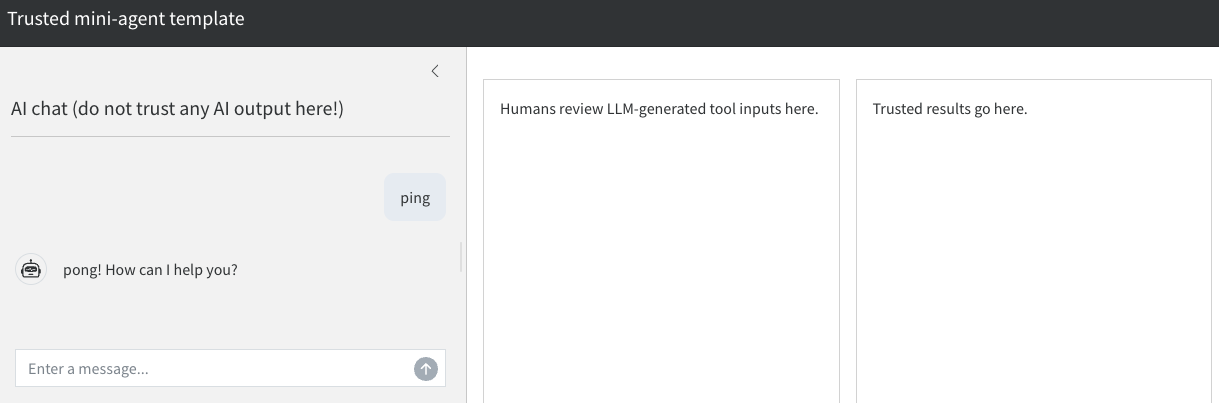
It is critical to create separate regions of trust and skepticism in the interface. Users need to know exactly which parts to trust, which parts to review, and which parts to never trust. We avoid injecting trusted results into the chat interface because it creates ambiguity about what to trust, which increases the risk that users will miss hallucinations.
3.3 Implementation
We separately consider the ellmer chat object, Shiny UI, and Shiny server function.
3.3.1 Chat object
In ellmer, the chat object brokers communication with the LLM, and it facilitates the registration of tools. Crucially for trusted mini-agents, a chat object supports no tools by default, so each tool must be explicitly registered (see the next chapter).
For convenience, we create a separate constructor for the ellmer chat object. This compartmentalization will be useful when we add tools and complicated system prompts.
We use chat_anthropic() in this example, but any chat object will do.
new_chat <- function() {
  ellmer::chat_anthropic(
    system_prompt = "You are a friendly, concise assistant."
  )
}
3.3.2 Shiny UI
In a trusted mini-agent, the user interface should have separate components for the chat, human oversight, and trusted results. That way, it is clear to the user which parts of the interface to trust, which parts to review, and which parts to always view with strong skepticism.
ui <- bslib::page_sidebar(
  title = "Trusted mini-agent template",
  theme = bslib::bs_theme(bootswatch = "cosmo"),
  sidebar = bslib::sidebar(
    title = "AI chat (do not trust any AI output here!)",
    shinychat::chat_ui("chat")
  ),
  bslib::layout_columns(
    bslib::card("Humans review LLM-generated tool inputs here."),
    bslib::card("Trusted results go here.")
  )
)
3.3.3 Shiny server function
In the Shiny server, we have a reactive expression that watches for user prompts from the shinychat interface and streams the LLM’s reply back into the UI token-by-token.
server <- function(input, output, session) {
  chat <- new_chat()
  shiny::observeEvent(input$chat_user_input, {
    stream <- chat$stream_async(input$chat_user_input, stream = "content")
    shinychat::chat_append("chat", stream)
  })
}
3.3.4 Full app code
This app.R script is a blank template to help you begin implementing your own trusted mini-agent.
app.R
new_chat <- function() {
  ellmer::chat_anthropic(
    system_prompt = "You are a friendly, concise assistant."
  )
}

ui <- bslib::page_sidebar(
  title = "Trusted mini-agent template",
  theme = bslib::bs_theme(bootswatch = "cosmo"),
  sidebar = bslib::sidebar(
    title = "AI chat (do not trust any AI output here!)",
    shinychat::chat_ui("chat")
  ),
  bslib::layout_columns(
    bslib::card("Humans review LLM-generated tool inputs here."),
    bslib::card("Trusted results go here.")
  )
)

server <- function(input, output, session) {
  chat <- new_chat()
  shiny::observeEvent(input$chat_user_input, {
    stream <- chat$stream_async(input$chat_user_input, stream = "content")
    shinychat::chat_append("chat", stream)
  })
}

shiny::shinyApp(ui, server)