%%{init: {'theme':'base', 'themeVariables': {'actorBkg':'#1F3A63','actorTextColor':'#ffffff','actorBorder':'#1F3A63','noteBkgColor':'#F3F4F6','noteBorderColor':'#9CA3AF','noteTextColor':'#1F2937'}, 'sequence': {'actorFontSize': 18}}}%%
sequenceDiagram
    participant User
    participant Model

    User->>Model: What's the weather in Chicago?
    rect rgba(220, 38, 38, 0.25)
    Model->>User: It's 50°F and rainy in Indianapolis.
    note over User,Model: AI error (wrong city)
    end
1 Deconstructing agents
An agent is an artificial intelligence system that interacts with its environment, pursues goals, and takes actions. Because agents rely on AI models, they are vulnerable to unpredictable errors. A few of the most common types of errors include subtle misinterpretations of prompts, lack of alignment with the user, and confident fabrications called hallucinations. To develop an agent that controls AI errors, we first need to understand the relevant components of agents and how they work together. This chapter describes these concepts and lays the groundwork for trusted mini-agents in later chapters.
1.1 AI models are not agents.
By itself, an AI model is just a text-in/text-out machine learning model. When generating predictions, an AI model has no ability to learn, no agency, and no ability to make decisions. It only predicts lexical “tokens” similarly to how a simple linear regression model predicts new outcomes on a new dataset.
No statistical model makes perfect predictions, which is why AI models produce errors. For example, suppose an AI model makes a prediction on this new dataset: “What’s the weather in Chicago?” The AI model blindly pattern-matches text to accompany the new data, and this prediction could be wrong.
1.2 Agent = AI model + harness
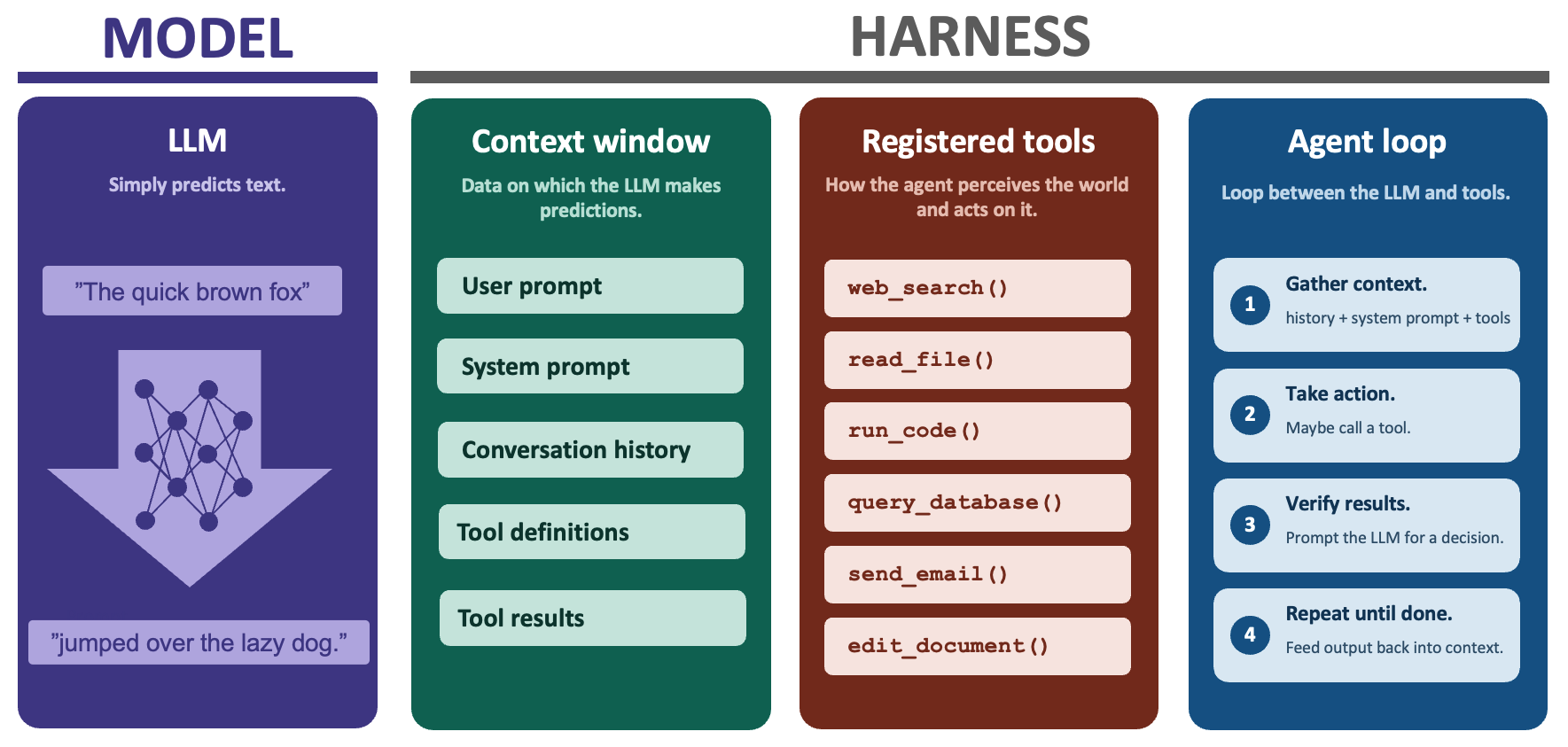
At the implementation level, an agent is an AI model combined with a “harness”. The harness is the non-AI computing infrastructure that surrounds the AI model: the chat interface, the conversation history, long-term memory files, the agent loop, and above all, tools.
1.3 How agents use tools
A tool is an external capability that the AI model can request to use. Tools empower the agent to perceive the world and act on it. Structurally, a tool is a function combined with metadata.
\[ \begin{aligned} \text{Tool} = \text{Function} + \text{Metadata} \end{aligned} \]
A function is a transformation from structured inputs to structured outputs, such as a system library, R function, API, or script file. The metadata is a set of instructions in the system prompt that tells the AI model when and how to use the function.
To request to use a tool, the AI model generates a tool call. A tool call is a string of text that identifies the tool and specifies a set of input values (i.e. function arguments). Tool calls are structured in a format like JSON so the harness can validate them against schemas. This enforced structure lets the harness parse the call and evaluate the tool.
1.4 Example: a weather agent
Let’s design an agent to get the current weather at a given location in the United States. Suppose we have a tool that scrapes the National Weather Service (NWS) API. We write an R function get_weather(), and we include metadata to describe its inputs, outputs, and purpose. Suppose the user prompts:
“What’s the weather in Chicago?”
Instead of a plain language response, the AI model may generate a JSON tool call:
{
  "tool": "get_weather",
  "input": {
    "lat": 41.8,
    "long": -87.6
  }
}
The harness recognizes this JSON string as a tool call and validates it against the schema for get_weather(). Afterwards, it runs the underlying function call:
get_weather(lat = 41.8, long = -87.6)and emits structured output back to the AI model:
{"temperature": "72°F", "weather": "Sunny"}The AI model may then incorporate this structured output into its next response to the user.
It’s 72°F and sunny in Chicago.
1.5 Illustrating the workflow
The following sequence diagram illustrates the workflow of the example weather agent from the previous section.1
%%{init: {'theme':'base', 'themeVariables': {'actorBkg':'#1F3A63','actorTextColor':'#ffffff','actorBorder':'#1F3A63'}, 'sequence': {'actorFontSize': 18}}}%%
sequenceDiagram
    participant User
    participant Model
    participant Tool

    User->>Model: "What's the weather in Chicago?"
    Model->>Tool: get_weather(lat = 41.8, long = -87.6)
    Tool->>Model: {"temperature": 72, "weather": "Sunny"}
    Model->>User: It's 72°F and sunny in Chicago.
The harness implicitly includes the horizontal arrows in the diagram. For example, the arrow labeled “get_weather(lat = 41.8, long = -87.6)” shows how the harness delivers the AI-generated tool call to the tool itself. (The harness, not the AI model, actually runs tools.) Designing a trusted mini-agent is all about drawing the best arrows, as we will see in the next chapter.
The documentation of
ellmercautions against this diagram because it draws a direct arrow from the AI model to the tool. As theellmerauthors rightly emphasize, the AI model does not actually run the tool: it only proposes an unevaluated tool call. However, our diagram is different because we think of the arrow as part of the harness. We do not imply that AI models run tools. We only imply that the harness delivers the call from the AI model to the tool. This simplified framing helps us build trusted mini-agents in later chapters.↩︎