4 Agent template
Web applications are by no means the only way to implement trusted mini-agents, but they are effective because the developer has complete control of both the frontend and backend. We can optimize the human user experience of reviewing AI-generated tool inputs, control all the tools, and cleanly separate trusted results from untrusted chat output. This chapter proposes a template for a trusted mini-agent as a Shiny app in R. Users can begin with this template and add their own ellmer tools to create a trusted mini-agent that fits their needs. The next chapter covers tools.
4.1 Prerequisites
At minimum, we use these R packages to implement Shiny-based trusted mini-agents.
| Package | Role |
|---|---|
ellmer |
AI model chat client with tool registration and streaming. |
shinychat |
Drop-in chat UI for Shiny that binds to an ellmer chat object. |
bslib |
Bootstrap-based interface elements such as page_sidebar and theming. |
4.2 Implementation
We separately consider the Shiny UI, ellmer chat object, and Shiny server function.
4.2.1 Shiny UI
In a trusted mini-agent, the user interface should have clear and separate regions for untrusted AI model output, human oversight, and trusted results. That way, the users know how to get trustworthy insights from the app: they understand where to go to review tool inputs, and they do not mistake untrusted AI model output for trusted results.
There are multiple ways to establish separate regions of trust and skepticism. The tool calling UI in shinychat, which embeds tool calls as obvious boxes inside the chat window, is the most popular, pragmatic, and versatile approach (c.f. commons and clinical-trials-agent).
However, to underscore the principles of trusted mini-agents, this guide chooses an alternative custom layout. We relegate the chat to a sidebar, and we reserve permanent first-class real estate for human oversight and trusted results. That way, users pay less attention to the untrusted AI model output and more attention to trustworthy output and vital review tasks. Not every UI can implement such diligent guardrails, especially if the harness has multiple remote tools with different output format types, but they are helpful when feasible.
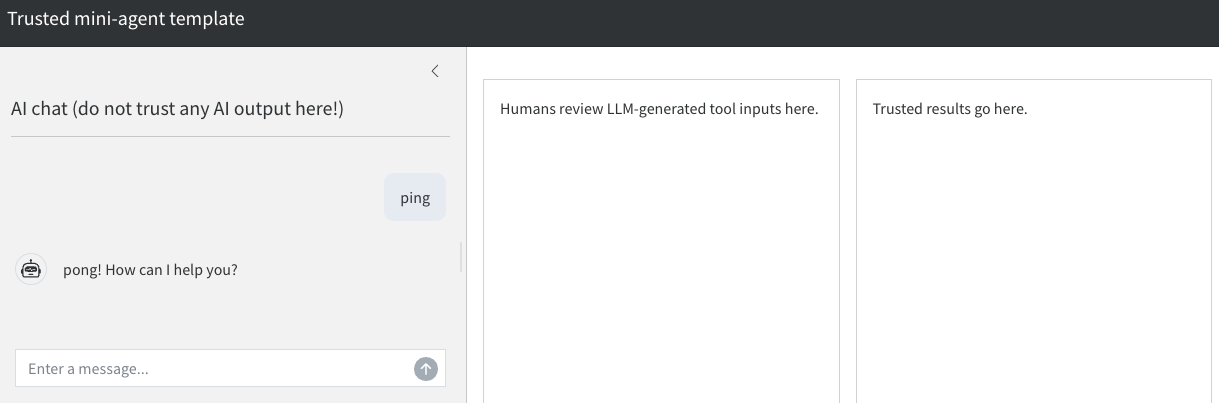
ui <- bslib::page_sidebar(
  title = "Trusted mini-agent template",
  theme = bslib::bs_theme(bootswatch = "cosmo"),
  sidebar = bslib::sidebar(
    title = "AI chat (do not trust any AI output here!)",
    shinychat::chat_ui("chat")
  ),
  bslib::layout_columns(
    bslib::card("Humans review AI-generated tool inputs here."),
    bslib::card("Trusted results go here.")
  )
)
4.2.2 Chat object
In ellmer, the chat object brokers communication with the AI model, and it facilitates the registration of tools. Crucially for trusted mini-agents, a chat object supports no tools by default, so each tool must be explicitly registered (see the next chapter).
For convenience, we create a separate constructor for the ellmer chat object. This compartmentalization will be useful when we add tools and complicated system prompts.
We use chat_anthropic() in this example, but any chat object will do.
new_chat <- function() {
  ellmer::chat_anthropic(
    system_prompt = "You are a friendly, concise assistant."
  )
}
4.2.3 Shiny server function
In the Shiny server, we have a reactive expression that watches for user prompts from the shinychat interface and streams the AI model’s reply back into the UI token-by-token.
server <- function(input, output, session) {
  chat <- new_chat()
  shiny::observeEvent(input$chat_user_input, {
    stream <- chat$stream_async(!!!input$chat_user_input, stream = "content")
    shinychat::chat_append("chat", stream)
  })
}
4.2.4 Full app code
This app.R script is a blank template to help you begin implementing your own trusted mini-agent.
app.R
new_chat <- function() {
  ellmer::chat_anthropic(
    system_prompt = "You are a friendly, concise assistant."
  )
}

ui <- bslib::page_sidebar(
  title = "Trusted mini-agent template",
  theme = bslib::bs_theme(bootswatch = "cosmo"),
  sidebar = bslib::sidebar(
    title = "AI chat (do not trust any AI output here!)",
    shinychat::chat_ui("chat")
  ),
  bslib::layout_columns(
    bslib::card("Humans review AI-generated tool inputs here."),
    bslib::card("Trusted results go here.")
  )
)

server <- function(input, output, session) {
  chat <- new_chat()
  shiny::observeEvent(input$chat_user_input, {
    stream <- chat$stream_async(!!!input$chat_user_input, stream = "content")
    shinychat::chat_append("chat", stream)
  })
}

shiny::shinyApp(ui, server)