%%{init: {'theme':'base', 'themeVariables': {'actorBkg':'#1F3A63','actorTextColor':'#ffffff','actorBorder':'#1F3A63','noteBkgColor':'#F3F4F6','noteBorderColor':'#9CA3AF','noteTextColor':'#1F2937'}}}%%
sequenceDiagram
    participant User
    participant Model
    participant Tool

    User->>Model: What's the weather in Chicago?
    rect rgba(220, 38, 38, 0.25)
    Model->>Tool: get_weather(lat = 41.8, long = -87.6)
    note over Model,Tool: Vulnerable (AI-generated coordinates)
    end
    Tool->>Model: {"temperature": 72, "weather": "Sunny"}
    rect rgba(220, 38, 38, 0.25)
    Model->>User: It's 50°F and rainy in Indianapolis.
    note over User,Model: AI error (wrong city)
    end
2 AI errors
This chapter explores the downstream consequences of AI errors in agent harnesses, and it shows how to harden an example weather agent against such errors. The intuition from this chapter motivates the definition of a trusted mini-agent in the next chapter.
2.1 Agents are vulnerable to AI errors.
“All models are wrong, but some are useful.”
— Box and Draper (1987)
Remember: an AI model has less-than-perfect prediction accuracy. AI models are fallible in ways that no amount of prompt engineering or context design can fully prevent. At any time for any reason, they may fabricate facts, misinterpret user intent, frame a problem misleadingly, omit critical details, or outright hallucinate. Prompt engineering and skill creation can never eliminate AI errors entirely. The choice of prompt and model improves convenience, but it cannot guarantee correctness.
Prompts, skills, and models are about convenience, not correctness.
For example, consider a simple weather agent.1 The agent has a single get_weather() tool, which scrapes the National Weather Service (NWS) API for real weather data. The agent elicits a location from the user, calls get_weather() to get the weather at that location, returns the result to the AI model, and relays the AI model’s response back to the user. Even though get_weather() gives the agent access to reliable data, errors can still happen through the AI model.
get_weather() unchecked, and even though the tool returns correct data for Chicago, the AI model can still produce errors when relaying the result, reporting the wrong city to the user.
As explained in the previous chapter, we interpret the arrows in the diagram as part of the harness. The arrow labeled “get_weather(lat = 41.8, long = -87.6)” shows how the harness delivers the AI-generated tool call to the tool itself. (The harness, not the AI model, actually runs tools.) As we will see below, designing a trusted mini-agent is all about drawing the best arrows.
2.2 How to fix the weather agent
To control AI errors in the weather agent, we do not try to improve our system prompt or choose a “better” AI model. That would be wishful thinking. Instead, we identify precisely where errors can happen, and we engineer the harness to eliminate those vulnerabilities.
2.2.1 Fix 1 of 3: Help the human review the location.
The AI-generated text of a tool call is a fallible prediction from the AI model. To control errors in tool calls, we need to build in human oversight while acknowledging the limitations of human attention and effort. In the case of the weather agent, most human users will not bother to check the longitude and latitude numbers in “get_weather(41.8, -87.6)”. Checking the raw coordinates of every tool call is simply too inconvenient for a human. Instead, we render an eye-catching interactive map with a pin in the location. That way, it becomes obvious to any human user whether the AI model chose the right place.
%%{init: {'theme':'base', 'themeVariables': {'actorBkg':'#1F3A63','actorTextColor':'#ffffff','actorBorder':'#1F3A63','noteBkgColor':'#F3F4F6','noteBorderColor':'#9CA3AF','noteTextColor':'#1F2937'}}}%%
sequenceDiagram
    participant User
    participant Model
    participant Tool

    User->>Model: What's the weather in Chicago?
    rect rgba(234, 179, 8, 0.25)
    Model->>Tool: get_weather(lat = 41.8, long = -87.6)
    note over Model,Tool: ① Coordinates rendered as a map for review.
    end
    Tool->>Model: {"temperature": 72, "weather": "Sunny"}
    rect rgba(220, 38, 38, 0.25)
    Model->>User: It's 50°F and rainy in Indianapolis.
    note over User,Model: AI error (wrong city)
    end
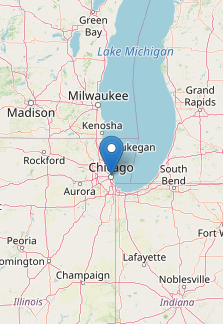
2.2.2 Fix 2 of 3: Bypass the AI model to report the weather.
We do not trust the AI model to describe NWS weather data, even if it’s just relaying data back to the user. Because it would require output from an AI model, even this simple task would be vulnerable to AI errors. However, we do trust the NWS weather data itself. Instead of reading about the weather from the AI model, we should read it directly from the tool it comes from. We engineer the tool to bypass the AI model and return NWS weather data straight to the user interface.
%%{init: {'theme':'base', 'themeVariables': {'actorBkg':'#1F3A63','actorTextColor':'#ffffff','actorBorder':'#1F3A63','noteBkgColor':'#F3F4F6','noteBorderColor':'#9CA3AF','noteTextColor':'#1F2937'}}}%%
sequenceDiagram
    participant User
    participant Model
    participant Tool

    User->>Model: What's the weather in Chicago?
    rect rgba(234, 179, 8, 0.25)
    Model->>Tool: get_weather(lat = 41.8, long = -87.6)
    note over Model,Tool: ① Coordinates rendered as a map for review.
    end
    Tool->>User: {"temperature": 72, "weather": "Sunny"}
get_weather() sends NWS weather data directly to the user interface instead of relaying it through the AI model. Bypassing the AI model for this step eliminates the risk of an erroneous weather report.
2.2.3 Fix 3 of 3: Never bypass the get_weather() tool.
Now, if the AI model chooses to call get_weather(), then we can trust the weather data we see. But what if the AI model decides to bypass get_weather() with a different tool? An agent like Claude Code may have dozens of tools, including tools to write and execute arbitrary code. Such general-purpose tools may compete with our weather tool and create a backdoor for AI errors. For example, if our weather agent has Claude Code’s Write() and Bash() tools, then the AI model may produce erroneous code to fake the data instead of calling our trusted get_weather() tool.
%%{init: {'theme':'base', 'themeVariables': {'actorBkg':'#1F3A63','actorTextColor':'#ffffff','actorBorder':'#1F3A63','noteBkgColor':'#F3F4F6','noteBorderColor':'#9CA3AF','noteTextColor':'#1F2937'}}}%%
sequenceDiagram
    participant User
    participant Model
    participant Tool

    User->>Model: What's the weather in Chicago?
    rect rgba(220, 38, 38, 0.25)
    Model->>Tool: Write("fake_weather.sh")<br>Bash("fake_weather.sh")
    note over Model,Tool: AI error (bypasses get_weather())
    end
    rect rgba(220, 38, 38, 0.25)
    Tool->>User: {"temperature": -999, "weather": "Vortex"}
    note over Tool,User: Fake data
    end
get_weather() entirely. Instead of calling the trusted tool, the AI model writes and runs its own script to fabricate weather data, producing a result that looks legitimate but comes from an untrusted source.
Trusted weather data must never come from the AI model, and it must never come from untrusted tools. We engineer the user interface so that it only ever shows weather data from get_weather().
%%{init: {'theme':'base', 'themeVariables': {'actorBkg':'#1F3A63','actorTextColor':'#ffffff','actorBorder':'#1F3A63','noteBkgColor':'#F3F4F6','noteBorderColor':'#9CA3AF','noteTextColor':'#1F2937'}}}%%
sequenceDiagram
    participant User
    participant Model
    participant Tool

    User->>Model: What's the weather in Chicago?
    rect rgba(234, 179, 8, 0.25)
    Model->>Tool: get_weather(lat = 41.8, long = -87.6)
    note over Model,Tool: ① Coordinates rendered as a map for review.
    end
    Tool->>User: {"temperature": 72, "weather": "Sunny"}
    rect rgba(107, 114, 128, 0.2)
    Model--xUser: ✗ Do not trust the model for weather data.
    end
    rect rgba(107, 114, 128, 0.2)
    Model--xTool: ✗ No other tool can produce weather data.
    end
get_weather() sends NWS data directly to the user interface, no other tool besides get_weather() can produce weather data, and claims about weather data from the AI model are not trusted.
Together, these fixes apply the principle of least privilege to the AI model. The model now only proposes coordinates, which the human verifies on the map, and the weather data itself comes only from a tool we can test in advance.
2.3 References
Box, George E. P., and Norman Richard Draper. 1987. Empirical Model-Building and Response Surfaces. Wiley Series in Probability and Mathematical Statistics. Wiley.
The documentation of
ellmercautions against this sequence diagram because it draws a direct arrow from the AI model to the tool. As theellmerauthors rightly emphasize, the AI model does not actually run the tool: it only proposes an unevaluated tool call. However, our diagram is different because we think of the arrow as part of the harness (see the previous chapter). We do not imply that AI models run tools. We only imply that the harness delivers the call from the AI model to the tool. This simplified framing helps us build trusted mini-agents.↩︎